
Shinjiru.com.my | Building Trust Online

Agent Protection for Desktop and Server Operating Systems

GravityZone ensures protection of Windows, Linux, and macOS systems through the Bitdefender Endpoint Security Tools security agent.

Features Windows Linux macOS
Workstations Servers Servers Workstations
Protection
Antimalware
Local Scan
Central Scan
Hybrid Scan
Advanced Threat Control
Anti-tampering (Vulnerable Drivers)
Anti-tampering (Callback Evasion)
Fileless Attack Protection
HyperDetect
Advanced Anti-Exploit
Ransomware Mitigation
Firewall
Content Control 1
Network Attack Defense 2
Device Control
Application Control (Whitelisting) GravityZone On-premises only
Full Disk Encryption
Patch Management
Patch Scan Server
Endpoint Detection and Response (EDR)
Blocklist 3
eXtended Detection and Response (XDR) GravityZone Cloud only
Risk Management GravityZone Cloud only 4
PHASR
Security for Exchange
Sandbox Analyzer
Automatic Submission
Manual Submission
Tamper Protection (self protect)
Container Protection
Integrity Monitoring
Operation
Power User
Role
Graphical User Interface (GUI)
Command-line Interface (CLI)
Uninstall Password

1 On Linux systems, only Application Blacklisting is available.

2 On Windows servers, Network Attack Defense is designed to detect and prevent RDP protocol authentication brute force attacks.

3 On Linux systems, adding connections to the Blocklist is not currently supported.

4 Risk Management is supported only on macOS Monterey (version 12) and later.

Prevention · Protection · Detection · Response

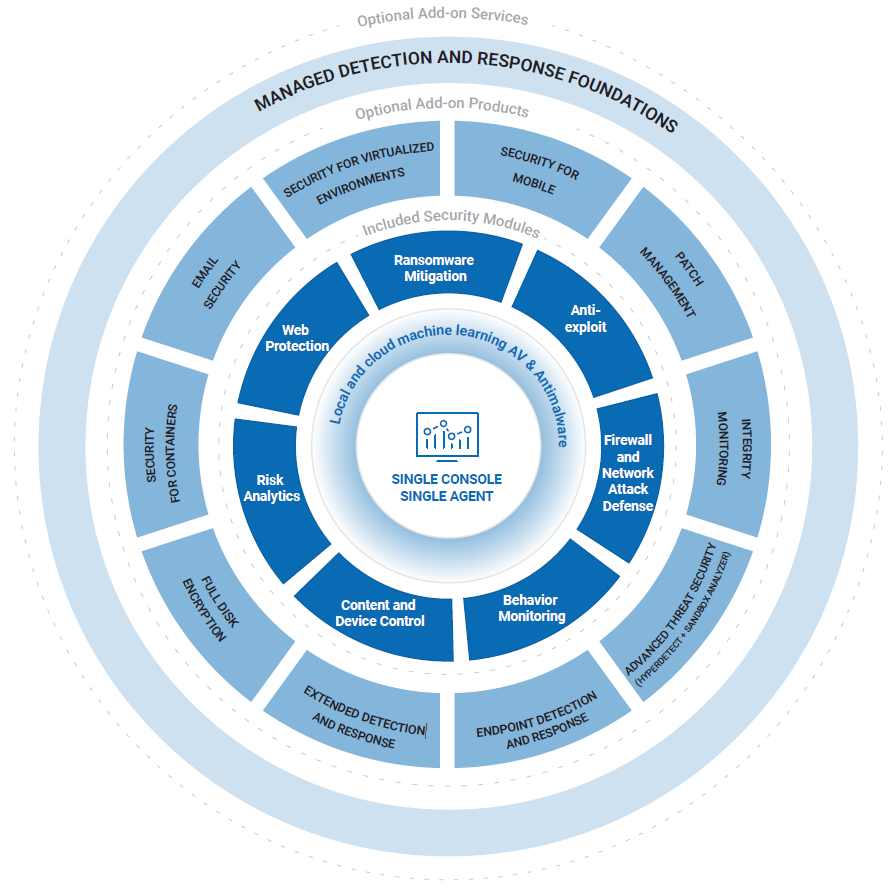
GravityZone stacks four layers of security so threats are caught and neutralised at every stage — before, during, and after execution.

Prevention

Risk Management, Patch Management, PHASR, Compliance Manager, Full Disk Encryption, and EASM reduce your attack surface before threats arrive.

Protection

Antimalware, HyperDetect, Fileless Attack Prevention, Ransomware Mitigation, Sandbox Analyser, and Network Attack Defense block all threat types.

Detection

Anomaly Defense, EDR, and XDR sensors across Identity, Network, Cloud, and Productivity Apps give complete environment visibility.

Response

MDR with 24/7 investigations, threat hunting, expert recommendations, and remediation by certified SOC analysts from global intelligence agencies.

Core Security Features That Power GravityZone

12 integrated security technologies. One platform.

Risk Management

Identifies, prioritises, and mitigates software vulnerabilities, risky configurations, and user behaviour through recurrent policy-driven risk scans.

Ransomware Mitigation

Detects suspicious encryption attempts, creates tamper-proof backups, blocks the encryption process, and automatically restores affected files.

Tunable Machine Learning

ML algorithms configurable to identify and block targeted and advanced attacks at pre-execution — powered by insights from 260+ top security researchers.

Fileless Attack Protection

Detects and blocks fileless malware at pre-execution — terminates malicious PowerShell, blocks traffic, analyses memory buffers, and stops code injection.

Sandbox Analyser

Automatic or manual analysis of potential threats in a safe cloud-hosted sandbox — delivers a verdict and full behavioural report for each sample.

Network Attack Defense

Checks all incoming, outgoing, and lateral traffic — protects against brute force attacks, port scans, password stealers, and lateral movement.

Exploit Defense

Protects against zero-day exploits by monitoring for specific exploitation techniques and blocking suspicious processes targeting common applications.

Anomaly Defense

Machine learning-based detection of unusual patterns or deviations from normal behaviour models — flags potential incidents for further investigation.

Process Protection

Continuous behavioral monitoring of all running processes — looks for signs of suspicious activity and automatically blocks processes when a threshold is reached.

Live Search

Query systems in real-time to perform threat hunting by looking for specific Indicators of Compromise (IOCs) or to streamline compliance tasks.

Incident Advisor

A human-readable description of an incident's root cause, MITRE tactics and techniques used, impact, and recommended response actions.

Content Control

Restrict or schedule access to websites, web categories, URLs, and applications — configure data protection rules for your organisation by policy.

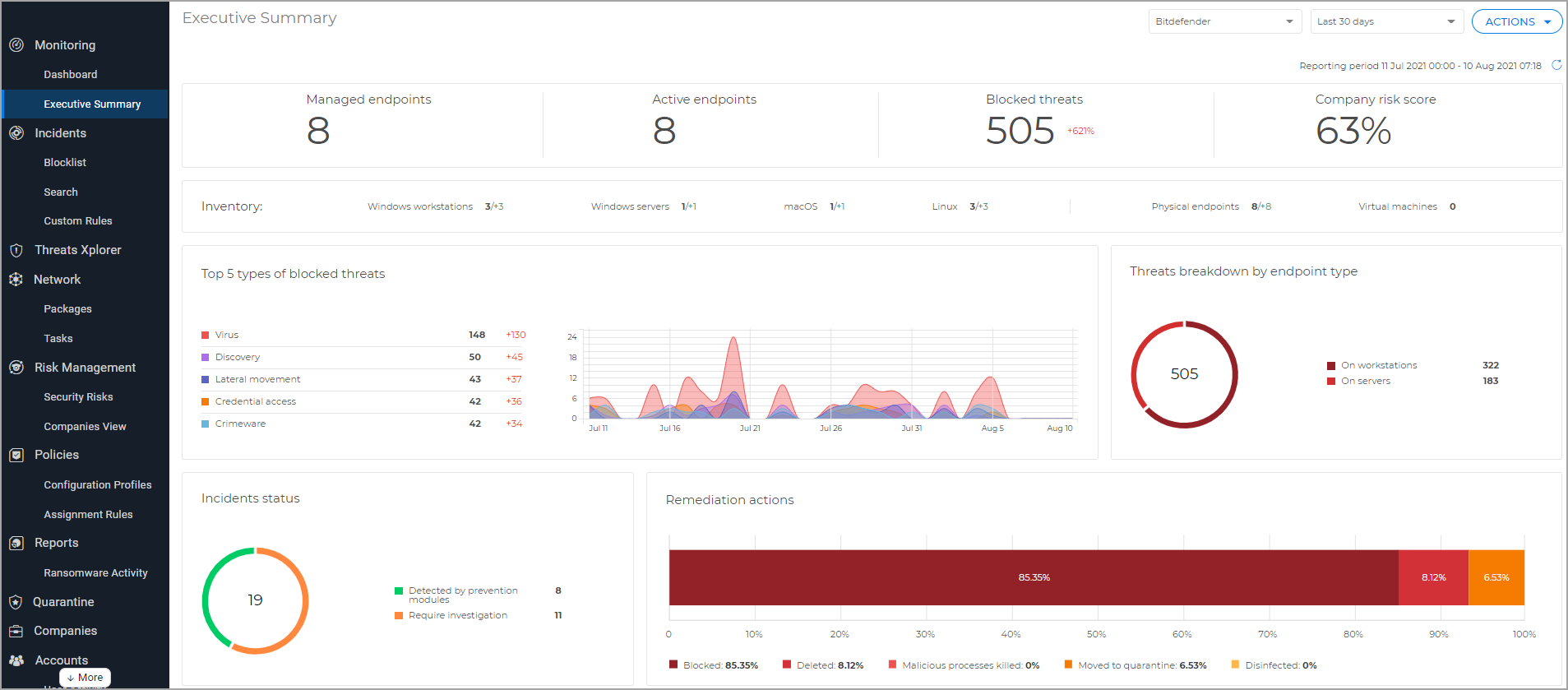
One Console. Total Visibility. Complete Control.

The GravityZone management console gives you a centralised view of all endpoints, policies, threats, and incidents — manage security at scale from anywhere, cloud-hosted or on-premises.

See GravityZone in Action

See how easy it is to elevate protection, expand capabilities, and manage security by leveraging the modular GravityZone platform — from a single intuitive management console.

  • Reduce the attack surface with proactive hardening
  • Block new ransomware and APTs automatically
  • Automate and simplify detection and response
  • Available as cloud-hosted or on-premises deployment
Telegram: ShinjiruHosting

Click here to chat with us.

Our Telegram support chat is 24 hours a day.

For alternate support channel, please visit support.shinjiru.com.my and submit a ticket or email to [email protected].

Thank you and have a nice day!